Search FontMaster

Showing posts with label typography. Show all posts

Thursday, February 7, 2019

Discopatentiously Obstructivenating FREE DEMO Font

'Discopatentiously Obstructivenating FREE DEMO'
by Doug Peters 

(BTW, That's me, guys.) 

It's a Handcrafted Curvy/Curly Sketched Print Script Pixel Font...

If you click on it, you should see this image at normal size.


This Font is a TrueType Bitmap Novelty Demonstration version font. It is available Free for Personal Use freeware to try a Demo of the Commercial Version.   If you like it, you can use it for personal projects.  If you want the commercial version (for commercial use), you will find the links to get it through the included text documentation.  

I made this smaller text sample version image which might be easier to see here.


Download the Official Release Archive at Font-Journal... https://w3n.us/do

Sunday, February 3, 2019

Free (CC0) Multilingual Constant Height Sans Block Font by JingYo

AZUL by JingYo

#Bold, #Condensed, Constant Height (exept accents), Block Filling #Sans #Font with a Modernized Art Deco Playbill look. 
 
https://w3n.us/azul
https://w3n.us/azul
 
CC0 PD #Free #Typeface with #Multilingual Support. 
 
It makes a fine font for a variety of needs, and although designed as art is quite legible and makes you slow down and read.  I think it looks good, I like it, or it wouldn't be here.  It will not fit everywhere, but it is a great font.  And free, and you can even modify it and create your own derivative if you want to take that route and tweak it or even redefine it and make it something else.
 
Note that you can use this one as a web font, too.  It has been released into the public domain as a freeware font that holds onto the authoring designer's Copyright, but you can pretty much do anything with it, and it's free!

Free for Commercial or Personal Use. Download from Font-Journal... 

Tuesday, January 29, 2019

Free Mohave Sans OFL Font & Web Font by Gumpita Rahayu & Tokotype

Mohave by Gumpita Rahayu & Tokotype

#Sans Serif #Typeface with a 4 Weight #FontFamily offering Regular & Italic styles (8 #Fonts).
 
https://w3n.us/mohave
 
OFL Freeware #Font#Family

About the Mohave font (as posted at the destination website):
------------
"Mohave is a titling display sans serif typeface, built with smooth height and dynamic glyph. It's designed for large points setting and contains four weights with each letterform is nearly monolinear, with fewer corrections applied to stroke and joints to maintain the typefaces structure remain visible.
https://w3n.us/mohave
 
"Initially designed by Gumpita Rahayu. as all-caps display fonts in 2013, it was expanded into a 4 weights family including matched italic in 2018. The new version has new body shapes, with more neutral and modulated forms, including some alternates in the uppercase and lowercase and equipped with OpenType Pro encoding."
------------
https://w3n.us/mohave

Download #Free from Fontesk...
https://w3n.us/mohave

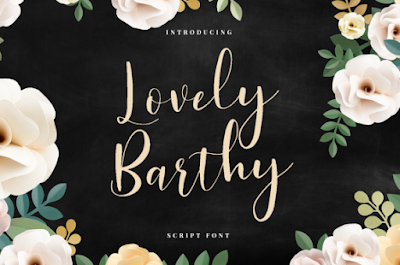
Free Cursive Calligraphy Script Font: Lovely Barthy by TJ Creative

Lovely Barthy by TJ Creative  

https://w3n.us/LovelyBarthy

https://w3n.us/LovelyBarthy

https://w3n.us/LovelyBarthy

https://w3n.us/LovelyBarthy

https://w3n.us/LovelyBarthy

https://w3n.us/LovelyBarthy

https://w3n.us/LovelyBarthy

 
Limited Time Free Download, don't miss getting this nice script for free.  Click any image or use the link below at the end of the page.  Free Download (for the next nearly 7 days) from Creative Fabrica...
https://w3n.us/LovelyBarthy

Thursday, September 13, 2018

ZOMBIES Commercial Font & Freeware HORROR Fonts

Getting ready for Halloween?  

Need some good HORROR FONTS?

First, a word of warning:
These horror related fonts are usually finely detailed. Therefore, these fonts & typefaces (each font, really) are so complex that IT WILL SLOW DOWN YOUR SYSTEM. This means you should take some extra precautions and only install the fonts you need to use when you actually need to use them for a project.  Even then, manage your fonts so that you are using as few as possible other fonts at the same time.

Lately, I've been running into some good fonts for Halloween

The first one I would like to introduce to you is called Zombies...

https://w3n.us/zombies

Zombies by MagicHandStudio
#Handbrushed #Printed #DryBrush #Brush #Script #Font
I suppose you could classify this hand lettered dry brush script as a Horror Font, right?  I would think so.  This font will set you back $16 at Font Bundles.
https://w3n.us/zombies

The next one is a real good deal...

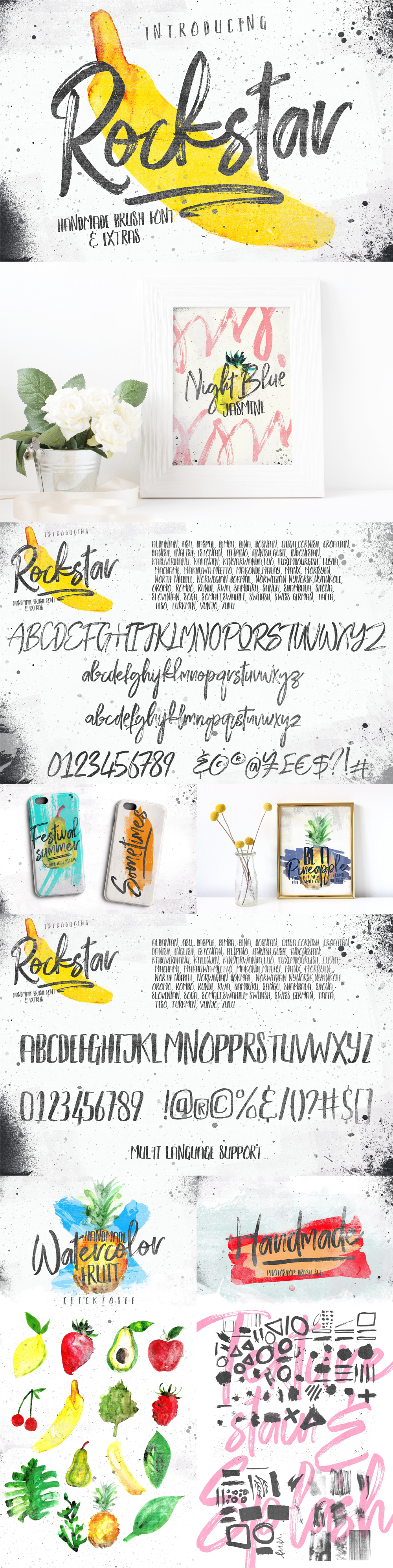
Rockstar Typeface by Efe Gürsoy
This #Free #Font Family comes with #Extras!
Rather dry brush stroke cursive script with a complementing wet brush printed display font. There are extra brushes, textures and graphics in this archive, as well.
https://w3n.us/rockstar
While I wouldn't classify this as a horror font, it certaintly wouldn't be out of place there, and the style gives you extra options.  Plus, there is a wet brush all-caps font.  Plus, the price is right

Rockstar Regular + Alternates + Swashes
Rockstar Display
Photoshop brush set
Png files
Splash
Textures
Swashes

Free for personal and commercial use from Pixel Surplus...
https://w3n.us/rockstar

On to the next good deal... 

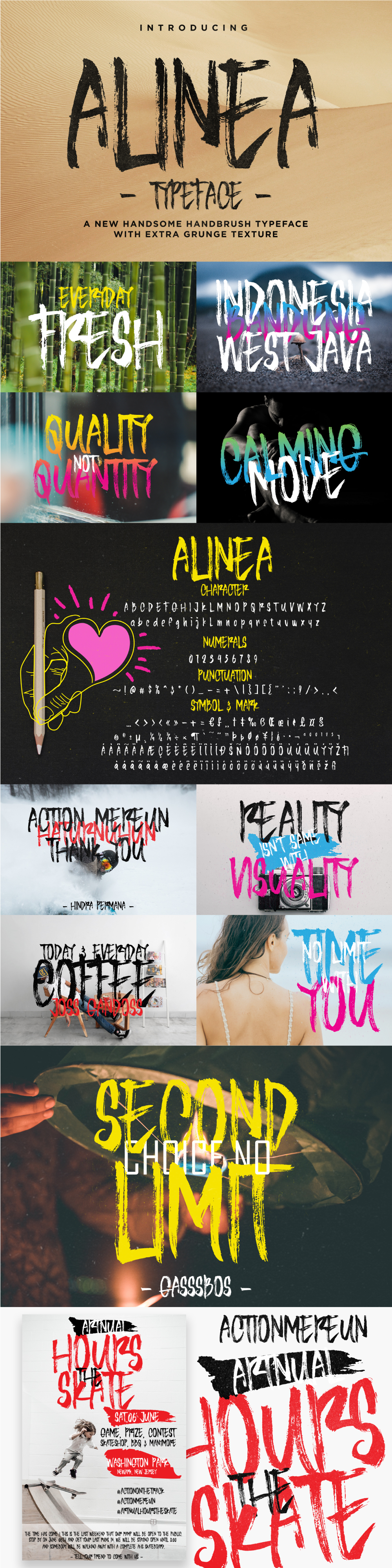
Alinea by Ndro
#FREE #DryBrush #Print #Font
Another Dry #Brush Hand Printed Font...
https://w3n.us/alinea
250 glyphs: characters, numerals, punctuation, marks & symbols, and it seems to fit right in as a Horror font.
Alinea is free for personal & commercial use projects from Pixel Surplus...
https://w3n.us/alinea

There's More!...

Silent Scream #Typeface by Andreas Leonidou
#FREE #AllCaps #DryBrush #Horror #Fonts
All caps (caps in both upper and lower case registers) dry brush horror sans print font family (regular & italic).
https://w3n.us/silentscream
This wild rough dry brush that makes this a winner horror font and is a #Freebie #FontFamily.

Free for personal or commercial use from Alt Foundry...
(you may have to create an account or login, add to cart, no card required)
https://w3n.us/silentscream

HAVE FUN!

Update: September 19th, 2018
I have another one...

Edo SZ #Free #Font by Vic Fieger
#AllCaps #Horror/#Halloween font
Most of the punctuation you would need for posters and such. 
https://w3n.us/edosz

https://w3n.us/edosz

https://w3n.us/edosz
Edo SZ isn't as detailed as Silent Scream, but that also means it will consume less computer memory, and if you have an older PC, it will slow it down less.  This font is a Free Font, archive download is available at Font-Journal.com:
https://w3n.us/edosz

Happy Halloween!

Wednesday, August 22, 2018

Font / Typeface Creation & Editing Software

I run a Google+ Community group on fonts (https://w3n.us/f0nts) and I wrote this a while earlier.  I just decided to update it, and because I don't know how to get the individual URLs for Google Community posts, I thought I would post it here...

Font Creation/Editing Solutions & Options

This started as a response to +ouggy vee about creating fonts. I had already mentioned about how sketching on paper with a pencil was a brilliant move to start, no matter the editor of choice. That said, there is a lot of places to go from there...

Now please understand that almost all of this is off the top of my head, though I did add links to a few resources I had handy...

Online Solutions

Calligraphr
https://w3n.us/calligraphr
At one time I downloaded a web app called font utility that would supposedly do the font scanning and converting, but I think it was so old that it wouldn't work with the server installed version of php. There have been free apps out there that created some nice fonts based on PDF sheets you filled in, but all the ones that I used were free and now a paid subscription app stands in their place.

Some of the fonts I created there are my favorite, but I don't like any subscription services (never, ever).

FontStruct
https://w3n.us/fs
As far as an online solution goes, I like FontStruct because it's free and always available online, but it has its limits. I also created a few fonts off scans of fonts I sketched. I scanned them in and uploaded them to a utility website that would make a font, but those services are no longer free and I am just not good with any subscription model (at all, ever, no way).

Even though this is a great learning tool and makes bonafide vector based modular fonts, the brick building system is extremely limited. It is used for teaching typography, but lacks bezier curves, or even a good assorted set of curved bricks to faux them in. You are reduced then, to angled fonts (and only has limited angles from which to choose). But it can be the start of many great fonts that you edit in a vector font editor, later.

Another huge drawback is that FontStruct inserts the "f" part of its logo in all unused characters, so you have to use another program to wipe out that instruction and your own version number and Copyright notice, though it does support the font Description.

Software
First, let me say that most paid or even subscription software usually has a deep discount for students, teachers, and educator staff. Usually about 50% (sometimes more, somethimes less). Have your student/staff school ID when you go shopping. Best news is that one of the best font editors is free...

If you need professional typography creation, editing and converting software on a budget, you can't get much more professional than FontForge, and it is FREE OpenSource Software.

FontForge
https://w3n.us/ff
If you have a spare PC, like me, I would download and install an older Linux distribution that would run FontForge because its open source and free. FontForge is probably one of the best font editing programs available, and it is free, so make use of that spare PC you upgraded from and create a dedicated font editing system.

Don't try to run it on a Windows machine through emulation, though. What a waste of my time (in my experience on all previous Windows versions)!

However, if you have a Mac, they are based on BSD (NetBSD, I think), which is just another branch of Unix, like Linux is. So I think that the MacOS has an easier time running FontForge.

FontForge really was the king of editors at one time. Fontlab may have taken the crown since, but FontForge is still updated regularly and supports modern type formats.

Fontlab
https://w3n.us/fontdesign
Fontlab now owns the 'Altsys', then 'Macromedia' Fontographer. I always wanted to get Fontographer, but unless you can find a bonafide used copy (most you buy on ebay are fake and include spyware & malware) or buy from the source ($400 USD) at Fontlab (https://w3n.us/fontographer for Windows or https://w3n.us/fontographermac for Macs). Ray Larabie (Typodermic Fonts) told me a year or so ago that Fontographer was the UI that the new FontLab Studio would be based on, which is an even more in-depth font creation software suite (https://w3n.us/fontlab for Windows or https://w3n.us/fontlabmac for Macs), but that one hasn't been updated for a long time now, and costs $600.00 USD.

Out of the Fontlab products I could only afford TypeTool (https://w3n.us/typetool) bundled with the ScanFont plugin (https://w3n.us/scanfont).

Glyphs
https://w3n.us/glyphs
Glyphs is a Macintosh only pro font creator/editor. It's biggest plus is that it is wildly easy to use. It supports all modern font standards I know of, including colorfonts.

Another big plus about Glyphs is that you can use it for enhancing your FontStruct creations. And in that way, FontStruct can actually be a great wire-framing tool, though you would obviously worry about getting curves just right in Glyphs.

There is a trial, a striped down version, and the full-on pro version. Glyphs is 249.90 €, while Glyphs Mini is 49.90 €.

Fontself
https://w3n.us/fsplugin
I am seeing more and more commercial fonts made with Fontself, which is an extraordinary plugin for either Photoshop or Illustrator (or get the bundle of both plugins for only about $79). These fonts I see made with fontself are usually offering OpenType Features, which is a real big plus for designers.

$49.00 for one plugin (Illustrator or Photoshop), and $79.00 to get them both as a plugin bundle. However, these only work on the Creative Cloud models of these Adobe products (and I don't do subscriptions), versions from 2015 & 1/2 and later.

FontCreator
https://w3n.us/fc
There is one more that is not real expensive, but is a paid app, "Font Creator" (starts at $79.00) by High-Logic. This is the font creation program that freeware font creator Vic Fieger used long ago, and has been updated very regularly since.

FontCreator is still available, but everytime I open it after installing it on a new computer, it is already out of the trial period. Heck, it takes me a month to install and configure software on a new PC, much longer to get comfortable and relax with it, so I wish I wouldn't always install that package so I could see it.

Microsoft Font Maker
(see last post for the Twitter posted link)
I also just posted about the Microsoft WindowsInk post I saw that says if you are a "WindowsInsider" (whatever that is), you can download the Microsoft Font Maker for free. It has a limited character set, but I think it covered Latin Basic.

Mobile Apps

Fonty
https://w3n.us/fonty
Fonty is a free app on the Google Play store for Android tablets (and phones, too) with a limited character set that only supports image programs by that same company (I could, though, make the font on my tablet, save & share it, and then use it on my Android smartphone with their app after logging in there). It's extremely limited, but both apps are free (the image app shows ads, I think). But all you can do is use the font in their apps, though I think they also have a word processor you can use it with. The resulting font will NOT work like any other TTF font on a Windows machine, though, and that is a shame.

iPad Apps...
(My iPad is Unsecure and won't run a thing)
iPad has a paid app for creating fonts, but it doesn't have the features of FontStruct and has many more limits.

Do What Is Right For You

It's obviously not just preference, there is that, but it really has to do with what works for you. At certain times I miss doing hand lettering fonts, at other times I am working on FontStruct projects so that I forget I need to install Linux and FontForge on the extra desk PC. So, I am guilty of shorting myself there, but I will get it done since FontForge does not run on any of my Windows machines (through their emulation package) reliably even one iotta.

I just find FontStruct so easy to access, and I already have so many projects going there. But it produces moldular fonts, and although those are optimized for Flash, no one uses Flash anymore (except maybe for animation/video production & video-titling), but that would be using older software they learned on and are clinging to.

But there are no bezier curves in Fontstruct (and a pretty poor curved block selection). That is extremely limiting. I try to find ways around that, but I usually take the wrong approach, there aren't curves big enough for me in Fontstruct and no matter how many times I request a set of 8 and (12 or 16) block curves over the years, my requests fall to deaf ears, and that REALLY limits the options there. Stupidly, I ignore them and try stuff anyway. But truthfully, because of that limitation, Fonstruct is only really good for producing straight block and angled fonts that don't rely on curves, only offering the rounded corners of your choice.

Glyphs is a Macintosh only program that does allow you to use FontStruct as sort of a prepublishing, wire-frame font editor, an it is easy to realize a vision there. Then you export a Glyphs file from FontStruct and you can edit with bezier curves and vectors. Right now, if you grab that from the fontstruct (https://w3n.us/fs) blog or live community page link, you get 10% off and it's not real expensive. You need a Mac, though.

I wish Adobe made a font editor. They seem to be too late for that game, now.

There are the commercial Plugins for Illustrator and Photoshop, and I understand they work well, but remember that they only work on the newest Creative Cloud series of Adobe subscription model products, not my Adobe Creative Suite 3 Master Edition. And, that sucks (for me).

There are some new fonts, SVG fonts and ColorFonts. Fontlab can produce those, and I think the plugins for Photoshop or Illustrator do, too. You can download the free program Fontlab Pad (https://w3n.us/colorfont) to see the colorfonts, but creating them is a different story I am not familiar with, though I understand FontForge, Fontlab, Glyphs & FontSelf all tackle them. I am not yet sure how in-depth FontCreator is.

There should be other things coming. I am really impressed with variable fonts. I think only FontLab Studio accommodates them? Anyone know of anything else?

But look at how Blender is a trove of 3D vectors. Why not a plugin for 3D programd to make variable width fonts, or start a new standard of 3D fonts that could not only offer variable widths, but also allow the user to tilt and turn the fonts within a document according to preference? Maybe even a transitory effect, where they tilt so much at the start, then so much at the end... of the word, sentence, paragraph or page? It just seems so obviously overlooked.

But like I said, it has to do with more than preference, it has a lot to do with convenience. FontStruct is extremely convenient for me, so I use it a lot. P{robably too much. But I do want to get a Mac and Glyphs one day, too.

It isn't convenient for me to use my other desk, so I don't access the old PC much. I don't have $400 or $600 to blow on font editing software, so I don't, and therefore have no experience with it (I am just looking at it with lustful eyes). I will be trying out TypeTool & ScanFont more, as I have finally figured out a place to set my scanner, and I am running out of things to attempt in FontStruct (and I don't have a Mac to run Glyphs and really tweak what is created in FontStruct).

I use Photoshop and Illustrator all the time because I'm a graphic artist/designer & marketer. Maybe that would be the best for me, just install the plugin... I have to raise the plugin cost and be able to cover my bills too, so giving out free novelty fonts as freeware software probably doesn't help my ability to buy the stuff I need and should have. I always hope people will link to me, or use my business services, but my work, even at the price of free, isn't drawing any crowds to it because they are novelty fonts or intended as logotype, because I design logos and market brands.

I want to try everything, heck, I would buy it all, but I have a business to run and strange expenses I have to account for that pop-up all the time without warning (which is why I don't like the software subscription model). But as soon as a new battery for my older laptop that I installed Linux and FontForge gets here (along with a new office chair), I'll stick the battery in and stop worrying about all the flashing lights (that is, I hope they go away).

You're just going to have to try everything you can and then settle down to what you like.

https://w3n.us/fontstruct
https://w3n.us/fontforge
https://w3n.us/fontlab
https://w3n.us/fontself
https://w3n.us/glyphs
https://w3n.us/fontcreator

Oh, and there is a free course on how to design fonts at The League of Moveable Type:
http://w3n.us/typedesign101

Thursday, March 22, 2018

Black Hymned Written Script Font Free for a Limited Time

Black Hymned, a multilingual handwritting script font from Stringlabs Type, is free for a limited time on Creative Market.

Black Hymned is a trio font package that comes in TrueType and OpenType font formats. The archive contains three styles on a central script design. Each of the fonts contain lowercase, uppercase, numbers, symbols and also support multiple languages. This font can use in any software without problem, and comes with a commercial license for unlimited commercial use.


Powered by Creative Market

Friday, March 16, 2018

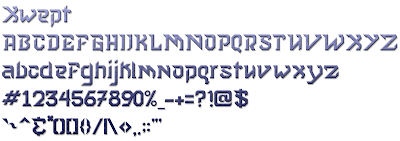
Xwept Fonts - 3 CC0 Freeware Fonts

I was quite surprised to find that a client for whom I am creating a logo chose the logo rendition (that I almost didn't even include) with my own font, Xwept.

I released this as a freeware (Creative Commons 0 - Copyright credit maintained free for Personal Use without any other restriction than it and all derivatives must remain under the same CC0 license) font some time ago, but no one really seemed too interested in it.  However, as unique styles go, this font seemed to fit the needs of his logo, specifically.  I even created a more muted version of the first Xwept font in order to find a good complementary font for the second line of text.

https://w3n.us/xwept

https://w3n.us/xwept

https://w3n.us/xwept


The original font is actually Xwept Small, named as such because of the smaller loops, ascenders and case style found in the lowercase a, b, d, e, g, i, j, k, m, n & t letters.  Eventually, I will change a few more of the lowercase letters, trying to compact them vertically.

I can remember David Carson asking me if I had any new crazy fonts.  He liked to use them when he was the art director for Ray Gun Magazine so that reading his Rock 'n Roll articles were an adventure.  I had no idea I'd fall in love with creating these fonts, myself.

But I also knew that I had to make the necessary corrections required for most everyone else (mainstream public and media).  Otherwise, my unique fonts aren't even going to get a second look.  After all, I would like to fit in and contribute to society, somewhere, somehow.  

So a more tamed version of Xwept was created.  And it did look good as the top line of my client's logo, but it still needed to be toned down and given a uniqueness of its own for the next couple lines of text, which was more descriptive and less logo-ish, it needed to be more legible (unless of course, you are an alien).  

So, because I could not find a font that complemented Xwept without over-powering it, or just being too lame, I created Xwept Plain Spoken for Common Folk, which offers its own unique flair but still works with Xwept.

I am going to update that font further, as well, and introduce the theme of the font to more of the characters.  In this case I will see it as an improvement, so it will be the same crazy font name, Xwept Plain Spoken for Common Folk, but a new version to overwrite this first one.  So, if you like it, grab it now.  ;)

Monday, March 12, 2018

Free Font Southampton Signature Script Font

Check out the very pretty, elegant script that is appropriate for branding, and weddings, or formal invitations, the typography "Southampton Signature" is a free for personal use demo of a commercial calligraphic script by Creatype Studio. It has a full uppercase and lowercase character set, although you have to get the full commercial licensed version from Creative Market.

Free Personal Use Only Version:
https://w3n.us/shampton

Full Commercially Licensed Version ($16):
https://w3n.us/southampton


The commercial license allows for
  • Commercial Use
  • Unlimited Number of Projects
  • Unlimited End Products For Sale
Creatype Studio is from Indonessia, and has quite a few fonts available. 

Monday, September 7, 2015

Font-Journal: Exclusive Original Fonts and Site Update

As many of you know, I am the fontmaster at Font-Journal.  Over the past year I have been pretty busy trying to save my work from disappearing completely.  I create a lot of freeware (and some shareware) graphics, website templates and fonts.  But, a rash of hard disk drive errors over the past year has thrown me for a loop.

A year ago, I had to recover from my first hard disk drive crash.  Although devastating, I seemed to be able to recover almost everything from backups on an external hard drive.  I even purchased a network attached storage drive device to help automate the backup process.

But six months afterwards (just over six months ago), the 1 TB hybrid 2.5" Seagate SSHD I used to replace the old failed Seagate 750 GB hard drive that crashed, failed without warning in a very hard crash.  Seagate has already replaced the hybrid drive that failed (as it was still under warranty), but I am still digging through old SDCards, MicroSDCards, Memory Stricks, Compact Flash, Flash Jump Drives and external hard drives trying to recover my files and data.  You see, I could never get that WD My Cloud NAS (newtwork attached storage) drive device to work right.

There was no way to recover the Seagate files and data.  I used all sorts of tools carefully trying to recover my data.  I even considered using a forensics lab to recover my work.  But I knew that I had just about everything up to 6, or now 7 months ago.

I am missing all of my font projects, but I do have all of my last distributed freeware/shareware font projects.  I am missing some photos and video here and there, but have most of it.  Some of my older video is missing the audio, though.

As for the rest, I am missing the work I did on websites and graphics for that 6 month time frame.  I seem to have all my music, though.

Losing my font and art projects was kind of a blow, though.  I had some pretty important (to me) projects that were much further along.  Now I have to restart them.

I now have the WD My Cloud NAS drive device working, but it is completely unreliable.  A tech walked me through recovering it and resetting it to factory specs, but it still falls off the network.  I added two USB 3 hard drives to the router, but I cannot access them through the network (I will be calling the tech about the new AC router, as well).

Clearly, technology isn't improving.  It is breaking easier and more quickly.  Heck, none of this stuff is even making it to the warranty expiration period.  And if a product is replaced, you get someone else's repaired device that some tech may or may not have fixed (and usually not, these things usually have multiple issues and the tech only addressed one because of time quotas on the job).

I laid-out some extra bucks for a 500 GB Samsung SSD 850 Pro.  I have spent 6 of the past 7 months recovering files.  I have setup backup options that still aren't working because of hardware and/or software failures.  I am completely exhausted from reorganizing my files, backing up files and images, yet it is NOT even done until I have a NAS solution that works.

In the past 3 months I quit my regular 'part time' job in order to attend more to my website and graphic design venture.  Which, of course, was complicated by all these hard drive failures.  So, I am busy just trying to get a little work together so that I can put some meat on the table every once in a while.

However, I have been trying to keep the Font-Journal updated with new fonts.  Lately, I have been adding a lot of web fonts that are ok for commercial use from Vernon Adams (view the entire catalog of available Vernon Adam fonts available at Font-Journal).  I do have more to add, and I will be doing so as time permits.  There are a few freeware fonts that are OK for commercial use by other designers, too.

I am also interested in starting some new font projects.  I am actually looking into doing some more professional freeware web fonts (OK for commercial use) that I will distribute exclusively through the Font-Journal PC TrueType font repository and catalog.  However, in order to do so, I have to look into crowd funding of the project, because now my spare time is getting scarce.  Let me know if you are interested.  I will detail possible projects in a few posts at a later date.

Font-Journal already does have some freeware fonts that I created which are distributed exclusively through the Font-Journal.com website.  But I am looking to sort of grow my personal font creations catalog into a font foundry of my own like Ray Larabie or Vernon Adams.  In order to do that, I need more professional software than the free tools I have been using.

I have already purchased some Fontlab products and I am looking to get a more professional editor now, like Fontographer.  I have already produced some freeware fonts, and my catalog is available at http://www.font-journal.com/search.php?q=Doug+Peters

But I will have to use crowd funding in order to do more projects.  Still, as I have been using free tools online previously, the quality of my typography definitely suffers due to the limitations of these free tools.  Is my portfolio even good enough to ask for crowd source funding, now that I have lost my last few projects that I was hoping would put me over the top?

Let me know, guys and gals.  Thanks!

Sunday, May 4, 2014

Too Much Fun

I indicated that I will be updating this blog with posts showing off my own font creations that I have made.  I do love to blog, but as I have so little spare time, I find that I prefer to spend it designing logos, menus, websites and fonts.

I now have a long list of fonts that I am working on.  Once in a while, if truly inspired with a simple design, I can create a simple, basic font with a pretty full character set in just a day.  But then, I have to document it. I write about how I made the font, what may have inspired it, any little challenges on the way.  I then add an appropriate license, trying to get the wording right right so that it is clear and easily understood.  I also make a couple of graphics.  One with the full character set, one just as a preview of what the font is capable of doing.  After a few rewrites, and sometimes a few font edits after checking it out in Photoshop, I'm done, but packaging-up a font really adds a whole 'nother day to the process.  Then I can upload it to my Font-Journal.

Once it is available at Font-Journal, I have to check it out and make sure it displays, that at least most of the characters in the preview page actually display.  Then, I have to edit it and add a couple of links to the font info page.  Sometimes I can approve it before I edit its information, but usually I wait until everything looks good and then go ahead and approve it in my administration control panel so that everyone else can see it.

Supposedly, I should then announce it in a few places the next day (in a couple of Twitter feeds, other social networks  like Facebook, BeHance, LinkedIn, WordPress, Blogger) and then I am done for the moment.

The thing is that I would rather be creating stuff than promoting it.  So I'm not marketing my stuff much, because I have more fun creating it.

I also have lots of other stuff going on, mind you.  Right now I am trying to recover my wife's laptop, and trying to get my son to get his homework done.  So there are always little things keeping me from what I ant to do, what I should be doing.

There is the problem that not many believe in Me the way I do.  Oh well.

But, rather than have you all wait for a post about each font that I have made in the past year, I'll just give you the link to the fonts I have already uploaded to Font-Journal: 

http://www.font-journal.com/search.php?d=1&q=Doug+Peters

Don't get me wrong, I will get around to posting little preview articles about most of my decent fonts, anyway.  But I am have way too much fun creating these fonts at the moment.  And I am actually excited to get these out and available to the public.

My fonts aren't usually met with the warmest receptions, as I like some obviously quirky styles.  But hey, they are freeware TTF PC fonts.  Although the license varies from font to font, I generally try to keep them free for personal, public or commercial use.

With some fonts I allow others to make their own derivatives, and yet with some fonts I want to be the exclusive developer.  With some fonts I allow redistribution.  With other fonts my Font-Journal will be the exclusive font archive distribution center.

So, please read the associated ReadMe.txt and License.txt included with each font archive.  I will protect my  intellectual property and all my rights to it (as that's all an artist ever has).  After all, I want to keep creating more art, and for my art to spread and influence the world as it has Me.  I sure as heck don't want to spend my time in the courts (but I will if I have to).

So, just pay attention to the license and we will both be happier, ok?  ;)

Thanks!  (Back to having too muck fun!...) -Doug

Thursday, April 17, 2014

Struck Freeware TTF Font

Struck is a freeware TrueType font for the PC I did.  The font Struck is Copyright 2013 Douglas Peters.


You are allowed to use the Struck font as-is for free for personal, professional and commercial use.  However, you may not modify, append or change the font other than porting the font over to another platform, such as the Macintosh.  No further distribution, or redistribution is allowed, as it is available officially from the author at:
http://www.font-journal.com/fonts/13104/struck.php

The only other online archive is intended for development purposes.

Struck was the second font that I had ever created.

This is a black sans serif minimalistic block font with a couple of repeating themes in the ends and such. I consider this freeware, but maintain my copyright and only allow distribution through FontStruct and my own journaled catalog of freeware fonts (@ font-journal.com).

Struck was created on Monday, the 22nd of July, 2013.

August 2-3, 2013:
Added the trade/service marks, TEL symbol, a few more currency signs and revamped many of the characters. The old K was cute, but I decided to opt with a style that would allow more consistent spacing.  I did make certain letters a bit more whimsical in an effort to keep that feeling.

I think this version has a more complete character set, but it is still kept basic to allow for fast downloads and low memory usage.  But if you are interested in seeing any particular character, or would like to see one corrected, get  a hold of me.  ;)

August 4th, 2013:
That small s was bothering Me all night at work.  It was the one thing I didn't get done right.  Taken care of, today.

Below is a simple example of the Struck character set:


The replacement characters exist as my logos (the joined DP, presented in the style of the font).

I hope it can be of use to some of you.  And again, I will consider requests for special characters.

My website:
http://www.Doug-Peters.com

My fonts portfolio:
http://www.font-journal.com/search.php?q=Doug+Peters

Contact me:
http://www.doug-peters.com/contact/
http://www.font-journal.com/contact.php

My business website (I sell the most competitively priced domains and hosting/servers on the net):
http://www.DomainHostmaster.com

Wednesday, April 16, 2014

Experimentation...

Over the past few years, things have become quite a challenge for me.  Back in 2008, the economy tanked and many stopped investing in new media marketing.  Most of those that did are doing well, now.  Everybody else is running to catch-up as the economy shifts back into high gear, again.

There had been less demand for my website design services and I took advantage of that to allow myself the ability to develop some of my own websites.  I even took a part time job to help with expenses and stay out of trouble.  But I feel that that decision has cost me a great deal.

Nevertheless, a couple of years ago I got hurt at my part time job.  That had me laying up for over a year and a half, tired and in pain.  I couldn't get much done, because I was still unloading trucks, still coming home tired, and on top of being so tired, I was in more and more pain.

After a year and a half, I finally received the surgery I needed and my hip is a lot better, now.  But I still experience pain (though now I have pain meds) and the clicking noise hasn't completely gone away.

This situation has made it ever increasingly hard to sit at a computer for long periods at a time, and in order to do some things that I enjoyed, like continuing to design, I have been experimenting with designing fonts.  For the most part, I find it a lot of fun, though it always seems that no one notices my work, as I am just getting started with this and have a lot to learn.

Right now I have been just trying to create a few unique fonts with my own take that might be useful for others.  I have also been checking out other people's fonts and changing them up, or adding a few characters that I think were needed.  But I am always playing with fonts that allow me to create derivatives of their their work and I always give the original artists credit.

But I have been playing and experimenting around with fonts for quite some time now.  And although I have made my works available to the public in one form or another (freeware or shareware), I haven't been promoting them very much.  So how would anyone know about them anyway, right?

So now I'm going to document my experimentation, and I'll probably start at near the beginning.  I probably won't post the few first fonts that I have done, as they were not noteworthy.  But I find that my hip is not doing as well as I thought it was, all of my old websites have been destroyed, and it is hard for me to stay at my computer for extended  lengths of time.  So working on fonts a little here and there is easy, where designing search optimized websites complete with both mobile and web oriented interfaces on a Content Manangement System such as MODx, PLD, WordPress or Typo3 takes great concentration and a lot of time to get them just right.

So, that's what I will be posting about for the next few days, documenting my successes in font making.  I hope someone will find some use out of what I have done.

Friday, September 20, 2013

Lately, I've been exploring a new font catalog... Hello Font.  They are specializing in Vector Fonts!  These are really ultra cool.  These fonts are the coming thing, right now.  I'm still trying to figure it out, but I want to make My own.  These Vector Fonts can be made pretty easily in a program such as Illustrator (if you know Illustrator), and I love Illustrator.

But I am still trying to get a handle on these Vector Fonts.  So, if you have any pointers or resources to share, please let Me know.  I can see that I have a lot of studying to do, but I am looking for all the recommendations I can get so that I don't have to wade through the junk.  ;)

Sunday, September 8, 2013

New PC TrueType Free For Personal Use Serif Hand Printed Font at Font-Journal

Milton Serif Bled Medium: A Robust Hand Printed Serif  

I am pleased to announce the latest of My fonts: Milton Serif Bled Medium version 4 is a hand printed serif that allows an elegant sloppiness in typeface, as it tries to conform to the likes of serif print fonts in handwritten form.

Milton Serif Bled is free for personal use (not for commercial use without permission from the artist... Me).  No derivative works should be based on this font, but otherwise it can be redistributed in its original distribution archive form.

Milton Serif Bled has an extremely robust character set that should make the entire western world happy.  I have included characters specifically used by Czech, Duetsch, España, Français, Greek, Italiano, Polski, Scandinavia, Turkish, Cyrillic, Ligatures, Math and extra Punctuation.  Counting them by hand, I come up with over 400 unique characters (each letter, accent and puntuation mark is redrawn with no copy and paste between letters/accents/punctuation).  Greeks may get a little ticked because My logo replaces the Captal PHI, but the Cyrillic EF character is identical.  I'll fix that in the next release.

Take a look:


The original official distribution archive is available from Font-Journal at:
http://www.font-journal.com/fonts/13120/milton_serif_bled_medium_version_4.php

I hope that you will find it useful for your personal projects and use!  -Doug Peters

Saturday, September 7, 2013

Create & Enhance Your Own Fonts, Free!

Due to unforeseen circumstances, I had to take a real hard look at My business.  The long and short of it is that as a web designer I only had a couple of the most recent sites that I have done in My portfolio, after over 14 years as a web designer.  I would design sites that the client would effectively ruin.  And once it was delivered, though proud of what I had managed to do despite the fact that they refused to listen to Me, they then managed to destroy it over time, or the business and website would go down, never to return (probably because they didn't listen to good, sound advice in the first place.  Then the economy slowed way down and our conservative Dakotans stopped investing or doing new advertising a couple different times, and I had to take other work twice.

After hurting myself at one of my so-called "part-time" jobs (tripping over a "safety feature" that is more dangerous than safe), most of My business was halted because I was either I was just too tired from unloading truck or just in too much pain to think.

But I have always wanted to design fonts.  For a couple of years now, I have been trying to run a Freeware PC TrueType Fonts website, Font-Journal.com.  The thing about designing a font is that although you can use valuable critiques from fellow peers as well as constructive criticism from the general public, no one is going to halt the project unless you do it their way.  No one is going to pick out the worst off all design mock-ups presented, because it's just you in charge, and you are responsible for your own work.  And you can be proud of it because you don't have an ass with no art education second guessing your every comment and over-riding your decision despite the logic.

I once worked on a website that was going to be the shining example of true optimized, best design practices using the industry standards of HTML5 and CSS3, and this guy took out all My code and put the presentation on tables! -Talk about CRAP Design!

There just isn't helping some idiots.  But the worst part is that he was a web design friend that fell behind the times and refused to trust Me.  Some friend.  Some designer!

I have been growing more and more tired of working for know-it-alls that think they know better when they are just hurting themselves, repeatedly, never learning, never advancing.

Then just lately, as I rest up My hip, I have found some great resources for anyone to design their own fonts, free of charge...

  • Fonstruct
    Fontstruct is a fantastic resource that allows its registered users to create scalable modular TrueType PC fonts, as well as pixel based TTF fonts.  The font editor is known as the FontStructor and although a little limited, is an extremely versatile and capable tool.  With pointers from other Fontstructors, one can easily create masterpiece fonts (aka "fontstructions").  I am working on my best one yet, now.  Once I am done with that one I will clone it and change all the little things I noticed could be changed when it was already too late.  It's hard to believe that this tool is free, but so ultra-cool that it is.  Thanks, Rob Meek!  ;)
  • MyScriptFont.com
    This one is a little gem that has been around a long time.  You print out a page of grid, hand draw your characters in their respective blocks (or cells), scan it @ 300dpi, upload the resulting image and it will use vectors to create a TrueType, OpenType or SVG Font of your characters for you.  Although I would like to see just a couple more characters, it does create a very usable font.  But I use this one to rope you in, because there is a more powerful such tool (Paint Font, listed next) that you can use to add any characters you choose.  
  • PaintFont.com
    Paint Font is a masterful script that not only allows you to create fonts, but allows you to append or overwrite fonts with new characters, any character you can display through your keyboard, perhaps more (support for languages, ligatures, math and more only takes a click of the mouse).  Obviously, this is a very powerful tool meant to be used to allow artists the ability to update or revamp their own projects, so please don't use it with fonts that you are restricted from doing so by the license.  I personally only use it to create new fonts and refine older versions.  The resulting font can be configured as an OTF (OpenType Font) or TTF (TrueType Font)  file and the tool even supports embedding your own Copyright message.  I say use My Script Font on your crazy ideas and use Paint Font to really develop the ideas that work.
  • FontPunk.com
    Font Punk is a really cool utility that allows you to play with your fonts by adding all sorts of effects to them.  Only the main unicode Latin letter sets are supported (Basic Latin, Supplement 1, and the Latin Extended Sets A & B).  But that pretty much covers the fonts of the western world, so it really is a great tool that will allow you to easily bold or lighten your font, randomly rotate or shake the characters, skew a font, turn a font into outlines, and more.  As you can see, you can take a font and come up with a bolder or italic version, or apply multiple, even all the effects... but watch out because there are some advanced ones like morph and add 3D effect.  This is also a powerful free tool.  
I plan to add more cool font tools as I find them, as well as announce My own font creations and highlight cool fonts.  For now, I hope this is enough to get you interested in the art of the font, and possibly started on some of your own creations.  It's always cool to hand a client a font used to produce his logo, perhaps with a version of his logo in it.

Happy font inspiring/creating/designing/fun!

-Doug Peters
Doug-Peters.com
@Font-Journal   @Fontstruct   @UserAlbum  @Behance
Add Me On Twitter:
@D_E_Peters   @Domainating   @FontJournal   @WDaDg