Search FontMaster

Thursday, September 13, 2018

ZOMBIES Commercial Font & Freeware HORROR Fonts

Getting ready for Halloween?  

Need some good HORROR FONTS?

First, a word of warning:
These horror related fonts are usually finely detailed. Therefore, these fonts & typefaces (each font, really) are so complex that IT WILL SLOW DOWN YOUR SYSTEM. This means you should take some extra precautions and only install the fonts you need to use when you actually need to use them for a project.  Even then, manage your fonts so that you are using as few as possible other fonts at the same time.

Lately, I've been running into some good fonts for Halloween

The first one I would like to introduce to you is called Zombies...

https://w3n.us/zombies

Zombies by MagicHandStudio
#Handbrushed #Printed #DryBrush #Brush #Script #Font
I suppose you could classify this hand lettered dry brush script as a Horror Font, right?  I would think so.  This font will set you back $16 at Font Bundles.
https://w3n.us/zombies

The next one is a real good deal...

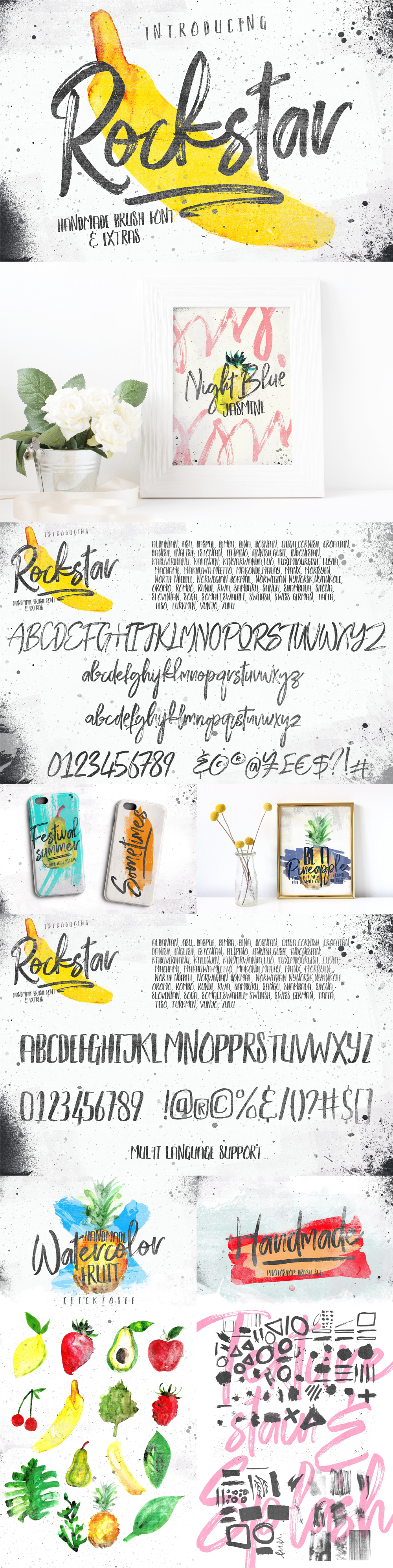
Rockstar Typeface by Efe Gürsoy
This #Free #Font Family comes with #Extras!
Rather dry brush stroke cursive script with a complementing wet brush printed display font. There are extra brushes, textures and graphics in this archive, as well.
https://w3n.us/rockstar
While I wouldn't classify this as a horror font, it certaintly wouldn't be out of place there, and the style gives you extra options.  Plus, there is a wet brush all-caps font.  Plus, the price is right

Rockstar Regular + Alternates + Swashes
Rockstar Display
Photoshop brush set
Png files
Splash
Textures
Swashes

Free for personal and commercial use from Pixel Surplus...
https://w3n.us/rockstar

On to the next good deal... 

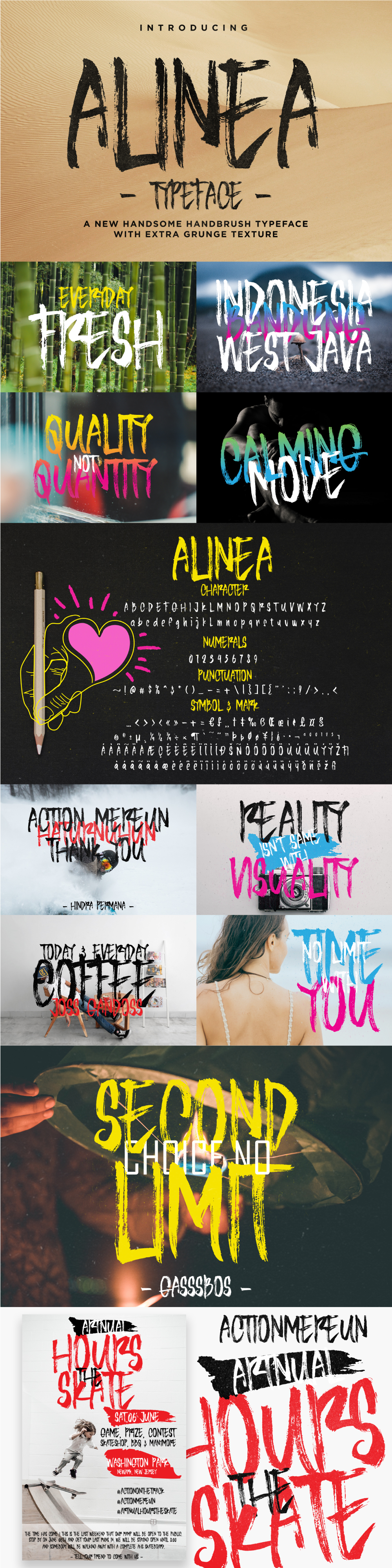
Alinea by Ndro
#FREE #DryBrush #Print #Font
Another Dry #Brush Hand Printed Font...
https://w3n.us/alinea
250 glyphs: characters, numerals, punctuation, marks & symbols, and it seems to fit right in as a Horror font.
Alinea is free for personal & commercial use projects from Pixel Surplus...
https://w3n.us/alinea

There's More!...

Silent Scream #Typeface by Andreas Leonidou
#FREE #AllCaps #DryBrush #Horror #Fonts
All caps (caps in both upper and lower case registers) dry brush horror sans print font family (regular & italic).
https://w3n.us/silentscream
This wild rough dry brush that makes this a winner horror font and is a #Freebie #FontFamily.

Free for personal or commercial use from Alt Foundry...
(you may have to create an account or login, add to cart, no card required)
https://w3n.us/silentscream

HAVE FUN!

Update: September 19th, 2018
I have another one...

Edo SZ #Free #Font by Vic Fieger
#AllCaps #Horror/#Halloween font
Most of the punctuation you would need for posters and such. 
https://w3n.us/edosz

https://w3n.us/edosz

https://w3n.us/edosz
Edo SZ isn't as detailed as Silent Scream, but that also means it will consume less computer memory, and if you have an older PC, it will slow it down less.  This font is a Free Font, archive download is available at Font-Journal.com:
https://w3n.us/edosz

Happy Halloween!

Wednesday, August 22, 2018

Free/Freeware Font Alternatives to Staple Commercial Fonts & Typefaces

@TheFuturIsHere did us a great favor by listing a lot of great free/freeware alternative fonts for commercial fonts...


...click on the graphic image to see the list at full size in the Gallery (or at least as large as your browser window will allow).

I would add my preference for Futura font family stand-in: Jost*

This resource was from a post on Twitter:
https://twitter.com/thefuturishere/status/1031599653924560897/photo/1?ref_src=twsrc%5Etfw%7Ctwcamp%5Etweetembed%7Ctwterm%5E1031599653924560897&ref_url=http%3A%2F%2Fdesigntaxi.com%2Fnews%2F401145%2FFont-Cheat-Sheet-Recommends-Free-Alternatives-To-Popular-Commercial-Typefaces%2F%3Futm_source%3DDT_Newsletter%26utm_medium%3DDT_Newsletter%26utm_campaign%3DDT_Newsletter_22082018%26utm_term%3DDT_Newsletter_22082018%26utm_content%3DDT_Newsletter_22082018

Font / Typeface Creation & Editing Software

I run a Google+ Community group on fonts (https://w3n.us/f0nts) and I wrote this a while earlier.  I just decided to update it, and because I don't know how to get the individual URLs for Google Community posts, I thought I would post it here...

Font Creation/Editing Solutions & Options

This started as a response to +ouggy vee about creating fonts. I had already mentioned about how sketching on paper with a pencil was a brilliant move to start, no matter the editor of choice. That said, there is a lot of places to go from there...

Now please understand that almost all of this is off the top of my head, though I did add links to a few resources I had handy...

Online Solutions

Calligraphr
https://w3n.us/calligraphr
At one time I downloaded a web app called font utility that would supposedly do the font scanning and converting, but I think it was so old that it wouldn't work with the server installed version of php. There have been free apps out there that created some nice fonts based on PDF sheets you filled in, but all the ones that I used were free and now a paid subscription app stands in their place.

Some of the fonts I created there are my favorite, but I don't like any subscription services (never, ever).

FontStruct
https://w3n.us/fs
As far as an online solution goes, I like FontStruct because it's free and always available online, but it has its limits. I also created a few fonts off scans of fonts I sketched. I scanned them in and uploaded them to a utility website that would make a font, but those services are no longer free and I am just not good with any subscription model (at all, ever, no way).

Even though this is a great learning tool and makes bonafide vector based modular fonts, the brick building system is extremely limited. It is used for teaching typography, but lacks bezier curves, or even a good assorted set of curved bricks to faux them in. You are reduced then, to angled fonts (and only has limited angles from which to choose). But it can be the start of many great fonts that you edit in a vector font editor, later.

Another huge drawback is that FontStruct inserts the "f" part of its logo in all unused characters, so you have to use another program to wipe out that instruction and your own version number and Copyright notice, though it does support the font Description.

Software
First, let me say that most paid or even subscription software usually has a deep discount for students, teachers, and educator staff. Usually about 50% (sometimes more, somethimes less). Have your student/staff school ID when you go shopping. Best news is that one of the best font editors is free...

If you need professional typography creation, editing and converting software on a budget, you can't get much more professional than FontForge, and it is FREE OpenSource Software.

FontForge
https://w3n.us/ff
If you have a spare PC, like me, I would download and install an older Linux distribution that would run FontForge because its open source and free. FontForge is probably one of the best font editing programs available, and it is free, so make use of that spare PC you upgraded from and create a dedicated font editing system.

Don't try to run it on a Windows machine through emulation, though. What a waste of my time (in my experience on all previous Windows versions)!

However, if you have a Mac, they are based on BSD (NetBSD, I think), which is just another branch of Unix, like Linux is. So I think that the MacOS has an easier time running FontForge.

FontForge really was the king of editors at one time. Fontlab may have taken the crown since, but FontForge is still updated regularly and supports modern type formats.

Fontlab
https://w3n.us/fontdesign
Fontlab now owns the 'Altsys', then 'Macromedia' Fontographer. I always wanted to get Fontographer, but unless you can find a bonafide used copy (most you buy on ebay are fake and include spyware & malware) or buy from the source ($400 USD) at Fontlab (https://w3n.us/fontographer for Windows or https://w3n.us/fontographermac for Macs). Ray Larabie (Typodermic Fonts) told me a year or so ago that Fontographer was the UI that the new FontLab Studio would be based on, which is an even more in-depth font creation software suite (https://w3n.us/fontlab for Windows or https://w3n.us/fontlabmac for Macs), but that one hasn't been updated for a long time now, and costs $600.00 USD.

Out of the Fontlab products I could only afford TypeTool (https://w3n.us/typetool) bundled with the ScanFont plugin (https://w3n.us/scanfont).

Glyphs
https://w3n.us/glyphs
Glyphs is a Macintosh only pro font creator/editor. It's biggest plus is that it is wildly easy to use. It supports all modern font standards I know of, including colorfonts.

Another big plus about Glyphs is that you can use it for enhancing your FontStruct creations. And in that way, FontStruct can actually be a great wire-framing tool, though you would obviously worry about getting curves just right in Glyphs.

There is a trial, a striped down version, and the full-on pro version. Glyphs is 249.90 €, while Glyphs Mini is 49.90 €.

Fontself
https://w3n.us/fsplugin
I am seeing more and more commercial fonts made with Fontself, which is an extraordinary plugin for either Photoshop or Illustrator (or get the bundle of both plugins for only about $79). These fonts I see made with fontself are usually offering OpenType Features, which is a real big plus for designers.

$49.00 for one plugin (Illustrator or Photoshop), and $79.00 to get them both as a plugin bundle. However, these only work on the Creative Cloud models of these Adobe products (and I don't do subscriptions), versions from 2015 & 1/2 and later.

FontCreator
https://w3n.us/fc
There is one more that is not real expensive, but is a paid app, "Font Creator" (starts at $79.00) by High-Logic. This is the font creation program that freeware font creator Vic Fieger used long ago, and has been updated very regularly since.

FontCreator is still available, but everytime I open it after installing it on a new computer, it is already out of the trial period. Heck, it takes me a month to install and configure software on a new PC, much longer to get comfortable and relax with it, so I wish I wouldn't always install that package so I could see it.

Microsoft Font Maker
(see last post for the Twitter posted link)
I also just posted about the Microsoft WindowsInk post I saw that says if you are a "WindowsInsider" (whatever that is), you can download the Microsoft Font Maker for free. It has a limited character set, but I think it covered Latin Basic.

Mobile Apps

Fonty
https://w3n.us/fonty
Fonty is a free app on the Google Play store for Android tablets (and phones, too) with a limited character set that only supports image programs by that same company (I could, though, make the font on my tablet, save & share it, and then use it on my Android smartphone with their app after logging in there). It's extremely limited, but both apps are free (the image app shows ads, I think). But all you can do is use the font in their apps, though I think they also have a word processor you can use it with. The resulting font will NOT work like any other TTF font on a Windows machine, though, and that is a shame.

iPad Apps...
(My iPad is Unsecure and won't run a thing)
iPad has a paid app for creating fonts, but it doesn't have the features of FontStruct and has many more limits.

Do What Is Right For You

It's obviously not just preference, there is that, but it really has to do with what works for you. At certain times I miss doing hand lettering fonts, at other times I am working on FontStruct projects so that I forget I need to install Linux and FontForge on the extra desk PC. So, I am guilty of shorting myself there, but I will get it done since FontForge does not run on any of my Windows machines (through their emulation package) reliably even one iotta.

I just find FontStruct so easy to access, and I already have so many projects going there. But it produces moldular fonts, and although those are optimized for Flash, no one uses Flash anymore (except maybe for animation/video production & video-titling), but that would be using older software they learned on and are clinging to.

But there are no bezier curves in Fontstruct (and a pretty poor curved block selection). That is extremely limiting. I try to find ways around that, but I usually take the wrong approach, there aren't curves big enough for me in Fontstruct and no matter how many times I request a set of 8 and (12 or 16) block curves over the years, my requests fall to deaf ears, and that REALLY limits the options there. Stupidly, I ignore them and try stuff anyway. But truthfully, because of that limitation, Fonstruct is only really good for producing straight block and angled fonts that don't rely on curves, only offering the rounded corners of your choice.

Glyphs is a Macintosh only program that does allow you to use FontStruct as sort of a prepublishing, wire-frame font editor, an it is easy to realize a vision there. Then you export a Glyphs file from FontStruct and you can edit with bezier curves and vectors. Right now, if you grab that from the fontstruct (https://w3n.us/fs) blog or live community page link, you get 10% off and it's not real expensive. You need a Mac, though.

I wish Adobe made a font editor. They seem to be too late for that game, now.

There are the commercial Plugins for Illustrator and Photoshop, and I understand they work well, but remember that they only work on the newest Creative Cloud series of Adobe subscription model products, not my Adobe Creative Suite 3 Master Edition. And, that sucks (for me).

There are some new fonts, SVG fonts and ColorFonts. Fontlab can produce those, and I think the plugins for Photoshop or Illustrator do, too. You can download the free program Fontlab Pad (https://w3n.us/colorfont) to see the colorfonts, but creating them is a different story I am not familiar with, though I understand FontForge, Fontlab, Glyphs & FontSelf all tackle them. I am not yet sure how in-depth FontCreator is.

There should be other things coming. I am really impressed with variable fonts. I think only FontLab Studio accommodates them? Anyone know of anything else?

But look at how Blender is a trove of 3D vectors. Why not a plugin for 3D programd to make variable width fonts, or start a new standard of 3D fonts that could not only offer variable widths, but also allow the user to tilt and turn the fonts within a document according to preference? Maybe even a transitory effect, where they tilt so much at the start, then so much at the end... of the word, sentence, paragraph or page? It just seems so obviously overlooked.

But like I said, it has to do with more than preference, it has a lot to do with convenience. FontStruct is extremely convenient for me, so I use it a lot. P{robably too much. But I do want to get a Mac and Glyphs one day, too.

It isn't convenient for me to use my other desk, so I don't access the old PC much. I don't have $400 or $600 to blow on font editing software, so I don't, and therefore have no experience with it (I am just looking at it with lustful eyes). I will be trying out TypeTool & ScanFont more, as I have finally figured out a place to set my scanner, and I am running out of things to attempt in FontStruct (and I don't have a Mac to run Glyphs and really tweak what is created in FontStruct).

I use Photoshop and Illustrator all the time because I'm a graphic artist/designer & marketer. Maybe that would be the best for me, just install the plugin... I have to raise the plugin cost and be able to cover my bills too, so giving out free novelty fonts as freeware software probably doesn't help my ability to buy the stuff I need and should have. I always hope people will link to me, or use my business services, but my work, even at the price of free, isn't drawing any crowds to it because they are novelty fonts or intended as logotype, because I design logos and market brands.

I want to try everything, heck, I would buy it all, but I have a business to run and strange expenses I have to account for that pop-up all the time without warning (which is why I don't like the software subscription model). But as soon as a new battery for my older laptop that I installed Linux and FontForge gets here (along with a new office chair), I'll stick the battery in and stop worrying about all the flashing lights (that is, I hope they go away).

You're just going to have to try everything you can and then settle down to what you like.

https://w3n.us/fontstruct
https://w3n.us/fontforge
https://w3n.us/fontlab
https://w3n.us/fontself
https://w3n.us/glyphs
https://w3n.us/fontcreator

Oh, and there is a free course on how to design fonts at The League of Moveable Type:
http://w3n.us/typedesign101

Tuesday, August 21, 2018

Limited Time Commercial Font Freebies

For this week only (the week of the 19th through the 25th of August, 2018), the following fonts featured here are high quality commercial fonts (with commercial and personal use licenses), that are offered for free as incentives to get you to visit their websites and check out all the fonts (& designs) these font/design oriented stores offer...

Striped King

https://w3n.us/StripedKing

https://w3n.us/StripedKing

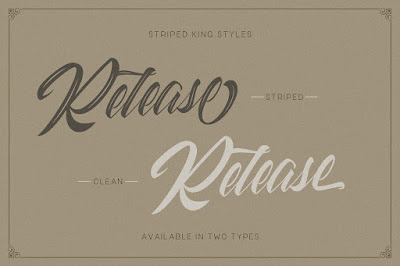
Striped King by Creatype Studio Co.
#Free (for a limited time) #Modern #Lettering #Script #Commercial #Font

This version of Striped King bundle is Free for Commercial Use, too (and personal use, of course). But, this font will only be offered for a while (maybe just this week, I don't know for sure, but it is a free 'incentive' download as of Monday).
 
https://w3n.us/StripedKing

https://w3n.us/StripedKing

Now, just because this is a new license doesn't mean you can use the personal use Striped King font you may have already downloaded. You actually DO have to download the commercial use allowed version from Creative Market.
 
https://w3n.us/StripedKing

If you don't remember Striped King, it is actually quite a vintage inspired, well lettered modern script typeface with all sorts of goodies; a regular and a clean version of the font; each with a complementing swashes font, in a variety of font formats, with versions for PC/Mac support...
 
https://w3n.us/StripedKing

Striped King (OTF/TTF/WOFF)
Striped King Swashes (OTF/TTF/WOFF)
Striped King Clean (OTF/TTF/WOFF)
Striped King Clean Swashes (OTF/TTF/WOFF)
More than 500 of glyphs
Ligature & Stylistic alternates
PUA Encoded Characters - Fully accessible without additional design software
 
https://w3n.us/StripedKing

Multilingual support for; Afrikaans, Albanian, Catalan, Danish, Dutch, English, French, Hungarian, Icelandic, Italian, Spanish, Portuguese, German, Swedish, Norweigen, Polish, Turkish, Indonesian, Zulu
 
https://w3n.us/StripedKing

Since this will likely be a limited time freebie offer, I am still keeping the other stripedking link active to the older 'personal use' version on Pixelify. This version uses a capitalized words link (StripedKing)...
https://w3n.us/StripedKing

https://w3n.us/StripedKing

Pruistine Script

https://w3n.us/pruistinescript

Pruistine Script by SUPOTYPE STUDIO
#Free #Freebie #Commercial #Cursive #Script #Font
Free for 6 & 1/2 days, a cute, well done commercial connected lowercase letter, cursive script font (with a commercial license for commercial or personal use).
 
https://w3n.us/pruistinescript

OpenType & TrueType versions, Commercial Font from Creative Fabrica...
https://w3n.us/pruistinescript

https://w3n.us/pruistinescript

Enjoy and God bless!

Friday, July 27, 2018

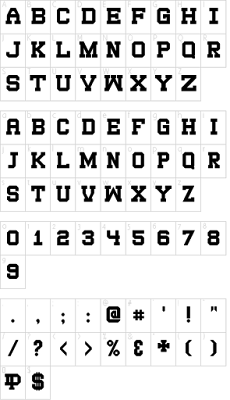
SDSU Collegiate V2 Wide Freeware (Web) Font

The good news is that I have been busy building fonts.  The bad news is that I have been so busy creating fonts on my own, building well documented archives and sharing fonts online in social media (in my Google+ fonts group, and on my Pinterest), that I have neglected this blog.

Starting today, I want to rectify that.  I have been updating Font-Journal, but added a few fonts of my own, as well.  So, I will start with my own fonts that have been archived there.

After following up my most popular font, SDSU Collegiate, with a second version that addressed some issues in the overall cohesive design of the font ('SDSU Collegiate V2'), I then extended that font with a new, wider version, 'SDSU Collegiate Extended', so that I was starting to build a V2 font family.

https://w3n.us/sdsucollegiatev2wide

Last year, I further extended that font family by creating this new font, "SDSU Collegiate V2 Wide", which of course, is even a wider version of my collegiate/sports block slab serif...

https://w3n.us/sdsucollegiatev2wide


SHORT (Vanity) URL:
https://w3n.us/sdsucollegiatev2wide

The usage license only requires that I be credited with an active link for use of the font, attribution for my work once (somewhere, blog, website or even in social media), and the license cites a number of links a persona can link to, to accomplish that.

https://w3n.us/sdsucollegiatev2wide

The SDSU Collegiate (V2) fonts started out life as a sports jersey font and therefore each font has a limited character set (SDSU Collegiate V2 Wide offers 98 glyphs).
However, the only punctuation missing from the Basic Latin letterset are the single & double, left & right, quotation marks (4 characters), plus it does include the TM & SM marks.

Friday, July 6, 2018

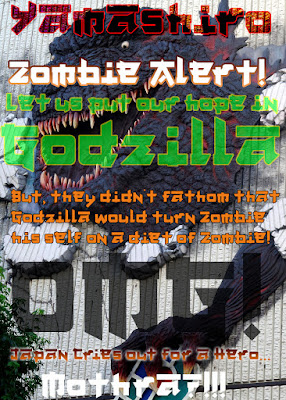
Free Graffiti TTF Web Font - Yamashiro

Officially released today :

Yamashiro

A free graffiti font & web font for personal & commercial use (under SIL Open Font License) redistribution, even derivative fonts OK.

Check out the sampler... a friend termed it a 'Latinasian' font... 

https://w3n.us/yamashiro
Basic Latin (upper and lower case letters, numerals & standard punctuation), with marks (Copyright, Registered Trademark, TM & SM), symbols & currency signs (dollar, cents, pound, euro, yen, bitcoin & generic money sign).

There are two characters not shown that are include, the S & s with cedilla
because my wife is Polish and though she may never use this crazy graffiti font,
I still have to support my wife's people in her honor. (Click image to see full size image).
I tried to build the font based on nailing planks together (trying to keep zombies out, I suppose). I ran into the A somewhere checking videos out, and then based the design of the entire font on that similar design.


#Free #graffiti #webfont #font #TTF

Wednesday, April 4, 2018

WebFont - A Free SIL OFL Font & Web Font

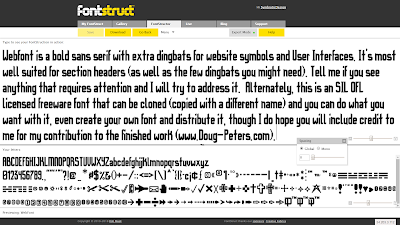
My "WebFont" has finally been ironed out so that it will install.  It is free, obviously you can use it on your website as a web font (#webfont), and has lots of little dingbat extras for UI symbols. It is a bold sans serif with some goth touches, intended for logos and section headers with very good ledgibility (or readability).

Today, I updated the following characters: / | \ & @ % ^ ( ) - + = : ; ' " n t m, still mulling over other changes. Anyways, I am still working on it, so updates may yet be forthcoming.  It has become apparent that I need to update a lot of the punctuation, I have a new style that needs to be applied to the other quotes, commas, semicolons, etc.  Always something.  But, it's getting there.

https://w3n.us/wf
"WebFont" a free bold sans serif with goth cuts & a few extra dingbats.
The development version is available at Fontstruct, the free online font editor.
This font is a good basic start for your own take, and is eligible for designing your own 'derivatives' (edited, modified, appended or stylized renamed copies based on the original font), so if you like it and you want to tweak it, feel free to go ahead and do just that.  You can clone it at Fontstruct and edit it there, or you can download it from Font-Journal (or FontStruct, but the official download distribution release is at my own site archive of fonts, Font-Journal {unless Google Fonts would ever want that job}) and then throw it into your favorite font editor.  I would hope to be acknowledged for my contributions to the finished font in the documentation.  Just be sure to rename this font, as it one uses the reserved name, "WebFont", and yours can't as well, or we would have too many fonts named the same thing.

WebFont is a modular font, which also means that it is well optimized for Flash, if you are still using that in, say, an animation video production environment.  I made the following preview image using a free metal background I grabbed from Graphic Flip...

WebFont Character Preview (limited number of characters displayed).
WebFont has an official distribution release version home page at Font-Journal
Now, please be assured that I am going to keep working on this, that it will improve over time.  That said, I may not be back here to officially announce a new version the next time it is updated, but I will come back and update this blog entry with updates when I can.

Currently, WebFont offers 611 glyphs and still is a very light load. Google Fonts requires 213 particular glyphs, and all of those are present, while supporting Basic Latin, Latin-1 Supplement, Latin Extended A, General Punctuation, Superscript & Subscript letterset registers, as well as the Copyright, (Registered) Trademark, Service Mark, TEL and FAX Letterlike Symbols, a few Currency Symbols, and a wide variety of Dingbats.  I have started the Latin Extended B letterset register, but have a long way to go on that one.  

Thanks for taking the time to check out my work.  Font-Journal is where I keep my officially released fonts, but it is also an archive of what I feel are great freeware and shareware fonts.  I try to post anything there that I can redistribute, especially stuff that I can use on websites (web fonts / #webfonts) and that are good for commercial projects such as logos.

Speaking of logos, I have to get back to one right now and will be back to publish this once I have the official distribution release archive ready to download.  ;)  See Ya!

 -DP
Dougs.Work
Doug-Peters.com
HDWebHosting.com  
DomainHostmaster.com
Salamander.US
W3DN.com